Social Media Web & Design
Drop
Cap
First implemented in episode one of Club Cast, I was able to figure out how to enable and utilize the drop cap feature in Wordpress. Now used by a majority of Bark staff, I was able to help sharpen peers' works with a professional-style drop cap. Currently, my stories use a 72pt sized standard drop cap.

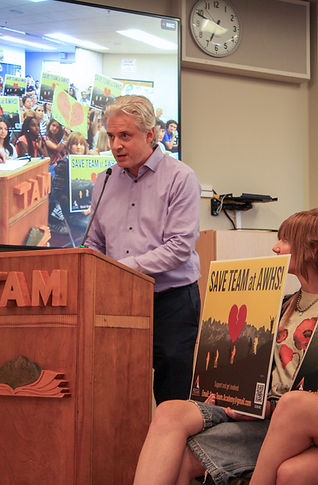
An example of a drop cap used in my April 21st story on TEAM.
Immersive half-photo and long format


The use of the immersive half-photo...
allows for more than just an aesthetic title card. Pictured above, I was able to use the immersive half-photo to display the featured image of the story with a color that matches the stories 'theme'. Whether its a Club Cast episode or a board meeting, I was able to use color to display either a more playful or serious tone. Furthermore, in my feature story District in Divide, I was able to use the Wordpress long format. The long format allows for a more complex layout off longer stories with certain section blocks for each part. Using the long format, I was able to create a high quality layout of the story and made it eligible for Best of SNO awards while also making the story look more aesthetically professional.
Page Design


Adobe Indesign
Adobe InDesign
I have been able to achieve proficiency in InDesign.
Through the three paste-ups I have been through, I have been able to utilize a step-by-step slideshow that showcases the process for laying out a page for the Bark.

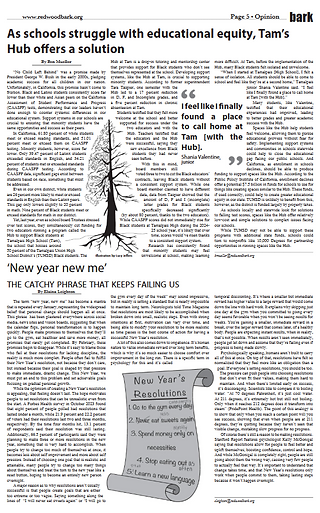
Pictured above, I have been able to utilize tools such as baseline alignment, text wrap and grids/margins to create a fleshed out and professional style newsprint page for the opinion section of the Bark. Starting my role as an opinion editor in Cub Bark, I have been exclusively laying out pages for the opinion section since I have been introduced to InDesign.
Pages by me as an Opinion Editor
using text-wrap, high quality art and a provided layout library for the Bark, I was able to create high-quality pages for the February and March cycles of the Bark.

Canva & Genially
First discovered independently when looking through Best of SNO stories...
I was fortunate enough to see that many stories were employing infographics powered by Genially. Genially, similar to Canva, is used to create infographics that can be embedded into web stories. The main difference, Genially allows for a third dimension: interactivity. With Genially, student journalists like myself are able to create clickthroughs, dropdowns, animations and more all in an infographic that can then be embedded into Wordpress.

Genially infographics by me
Created for the Addiction compiled Bark report, I was able to create a 'mind-map' style infographic with clickable elements that allow for more info to be present than on general embed infographics. You are able to click on the grey boxes to view quotes from trustees on their perspectives on smartphone addiction. The plus buttons show if they voted YES or NO on phone-free schools in the district.
Created for the Addiction compiled Bark report, I was able to create a menu that allows for readers to click and view data on certain substance and their use statistics throughout the school district. I was able to create interactive buttons that open windows and a pulsing animation as well.
Canva
Canva Infographics for District in divide
The Hub
The decision to cut the $250,000 outside educators for the Hub at Tamalpais High School was a complicated decision. Through contracts purchased without board consent, a decision that brought out numbers of students, parents and community members to voice their opinions on the story and a spot to fill that is currently open again. The Hub has been a complicated story to follow. This infographic, made my me, showcases a simple breakdown of past events from the event.
CAASPP
Many students, staff and parents voiced concerns over the decision to cut the outside educators for the Hub while citing low CAASPP scores for Black students in the district. Being one of the strongest arguments for why the Hub needs to exist, a Canva infographic was needed to visualize the argument made by many members of the Tamalpais High School community.
Teaser
In order to promote the center-spread story, I worked and communicated with social media manager Madison Bishop to create a social media post for the story. Using custom templates made for the Bark on Canva, I was able to create a professional teaser for the story. Overall, the story reached over 2,500 views.
Miscellaneous infographics
Earlier in the year, myself and Reed Grossman helped create scannable QR code infographics for the print editions of the Bark. Using Canva, we were able to advertise our podcast in other areas of journalism.
Social Media
Instagram stories